 Hindsight
Choose an AI engine
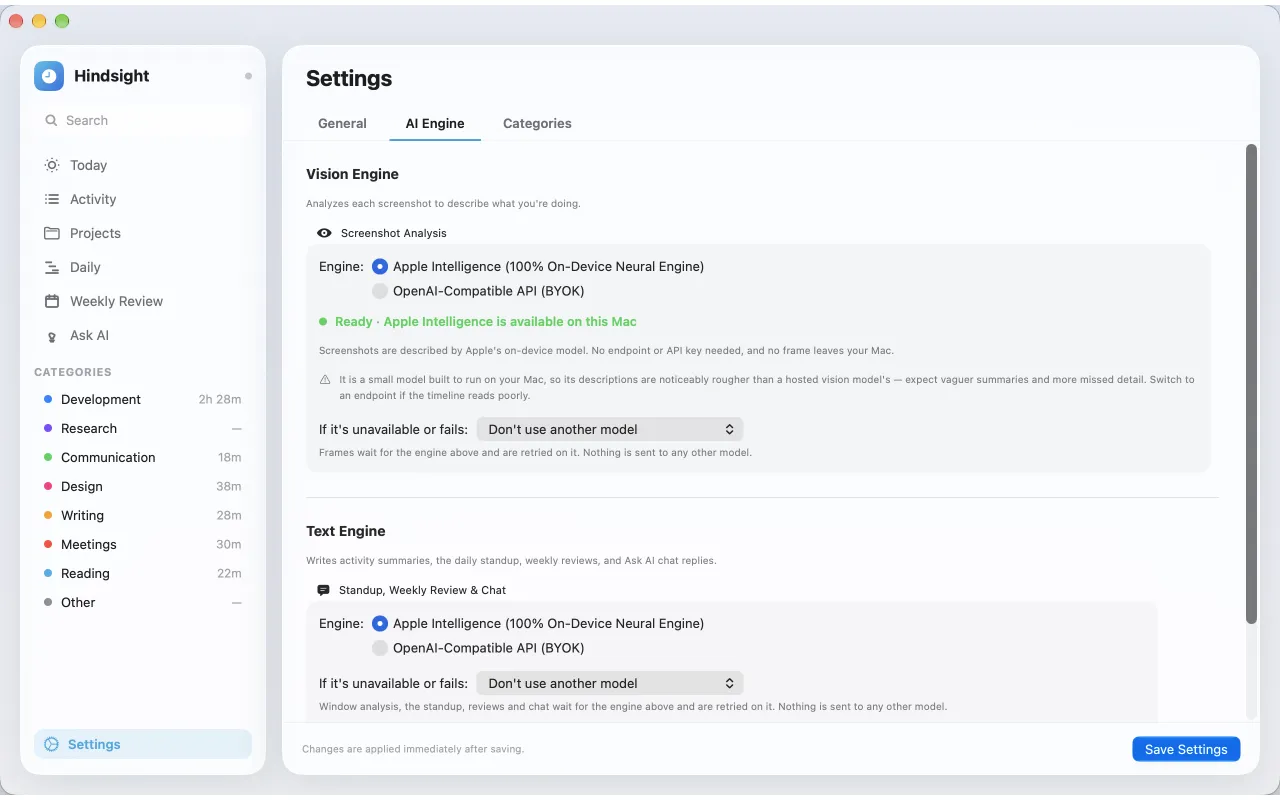
Hindsight uses two engines that you choose in Settings → AI Engine. It uses only the engines you pick, and never switches on its own.
Vision Engine and Text Engine
- The Vision Engine analyzes each screenshot to describe what you are doing. Only automatic tracking needs it.
- The Text Engine writes activity summaries, the daily standup, weekly reviews and Ask AI replies.
The options
| Engine | Where it runs | Notes |
|---|---|---|
| Apple Intelligence | On your Mac | Text on macOS 26 and later. Screenshots on macOS 27, when your Mac offers it. No endpoint or API key. |
| OpenAI-compatible API (BYOK) | Your endpoint | OpenAI, OpenRouter, or a local server such as Ollama, LM Studio or llama.cpp. |
On macOS 26, describing screenshots needs your own endpoint. A local server keeps screenshots on your Mac. A cloud provider receives the content needed for analysis, directly from your Mac, with your own API key.
Set it up
- Open Settings → AI Engine.
- Under Screenshot Analysis, choose an Engine:. For an endpoint, enter the Vision API Base URL: and Vision API Key:.
- Under Standup, Weekly Review & Chat, choose the Text Engine the same way.
- Optionally set If it’s unavailable or fails: to a fallback. Leave it at Don’t use another model to never fall back.
When an engine can't run
If neither your engine nor its fallback can run, tracking won't start and Settings says why. A window no engine could analyze waits in Review to retry, instead of being filled in with a guess. Every activity shows which model wrote it.
Thinking models whose replies come back cut off can help from Ask the model to skip reasoning in Settings → AI Engine.
Still stuck? Email [email protected] and we will help.