 Hindsight
Review and correct activities
You have the last word on your timeline. Review collects everything that needs a look; any change flows through Today, Daily and exports.
Review today
- On Today, open Review. Review today lists every activity that needs a look, with the reason it was flagged.
- For each one, choose Looks right, Edit to fix its title, project or category, Ignore to stop raising it, or Retry to analyze its frames again.
- When you're done, the sheet says All caught up.
Edit one activity
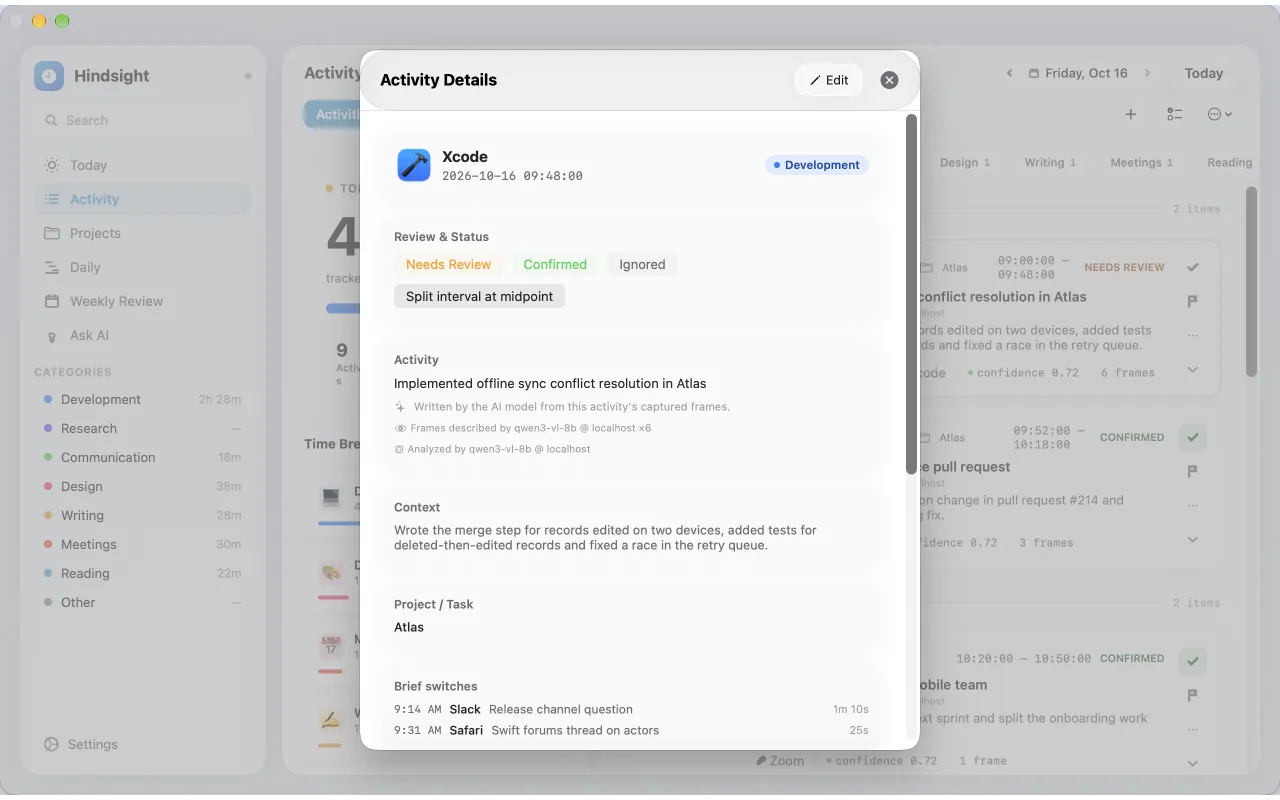
Open any activity from Activity, Daily or Today to see Activity Details: its steps with times, the screenshots and screen text behind it, and the model that wrote it. From there you can edit it, mark it Needs Review, Confirmed or Ignored, Retry analysis, or Delete it.
If an activity covers two tasks, use Split interval at midpoint. The second half is marked Needs review so you can describe it.
Change several at once
In Activity, select several rows, then use Confirm selected, Ignore selected, Reclassify selected or Move to project. With the keyboard, J and K step through review and C confirms the focused row.
Still stuck? Email [email protected] and we will help.